How to Create Robots Txt: What Every Web Designer Should Know About Web Hosting and SEO
Every website gets visitors you never see: search engine crawlers, also called bots or spiders. They scan your pages, follow your links, and decide what appears in search results. A small text file called robots txt or robots.txt gives you a say in how they behave. If you want to create robots txt correctly, you need to understand what it does, where it lives, and how it ties into your Web Hosting setup.
What Is a Robots.txt File?
Robots txt or robots.txt file is a plain text file placed in the root directory of your
website, for example yourdomain.com/robots.txt. It follows
the Robots Exclusion Protocol, a long-standing standard that tells
crawlers which parts of your site they may or may not request.
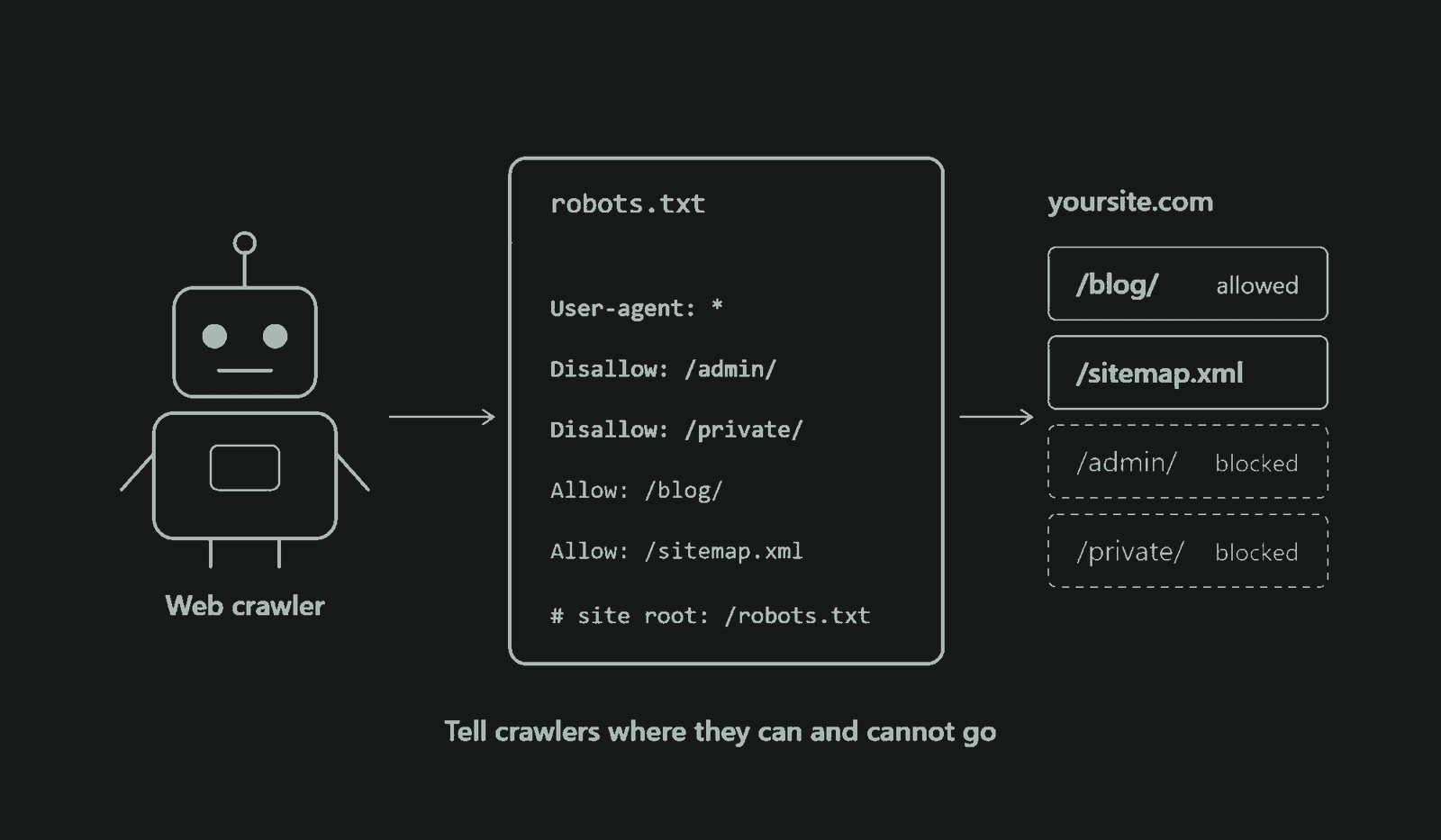
When a well-behaved bot arrives, the first thing it does is look for the robots txt file. If it finds one, it reads the rules and crawls accordingly. If there is no robots txt file, then it assumes everything is open to crawling. That means a robots txt file is not necessary if you have no files or directory to hide from being crawled like some banking or financial pages.
The robots txt file is built from a few simple directives:
- User-agent: names the crawler the rules apply
to (
*means all bots). - Disallow: blocks a path from being crawled.
- Allow: permits a path, often as an exception inside a blocked folder.
- Sitemap: points crawlers to your XML sitemap.
A basic example looks like this:
User-agent: *
Disallow: /admin/
Disallow: /cart/
Allow: /admin/help.html

Sitemap: https://yourdomain.com/sitemap.xml
Why Do You Need a Robots Txt File ?
Not every page on your site deserves a crawler's attention. A robots txt file matters for several reasons:
- Crawl budget management. Search engines allocate limited crawling resources to each site. Blocking low-value pages, such as internal search results, filtered URLs, and duplicate parameters, helps bots spend that time on pages that matter.
- Keeping private areas out of crawl paths. Admin panels, staging folders, and checkout pages don't need to be crawled.
- Reducing server load. Aggressive bots can slow a site down. Limiting what they request protects your resources.
- Guiding bots to your sitemap. The Sitemap directive helps search engines discover your important pages faster.
- Controlling media and file crawling. You can stop crawlers from fetching certain PDFs, scripts, or image directories.
How to Create Robots Txt File and Use It
Easily create robots txt file, and you don't need special software.
Step 1: Open a plain text editor. Notepad, TextEdit (in plain text mode), or any code editor works. Avoid word processors, which add hidden formatting.
Step 2: Write your rules. Decide which folders or URL patterns should be blocked. Start simple and only add rules you understand.
Step 3: Save it as robots.txt. The name
must be lowercase and exact, with UTF-8 encoding.
Step 4: Upload robots txt file to your root directory. Use your
hosting control panel's File Manager or an FTP client and place it in
the top-level folder (often public_html). A file in a
subfolder will be ignored.
Step 5: Test it. Visit
yourdomain.com/robots.txt in a browser to confirm it loads. Then
use the robots.txt report in Google Search Console to check that Google
can fetch and read it correctly.
Many CMS platforms, including WordPress, can generate a virtual robots txt file automatically, and SEO plugins let you edit it from the dashboard. Even then, it's worth knowing what the robots txt file contains.
How Robots Txt File Helps Web Hosting
Robots txt is closely tied to Web Hosting performance. Every crawler request uses bandwidth, CPU, and memory on your server. On shared plans in particular, heavy bot traffic can slow page loads for real visitors.
A well-configured file reduces unnecessary requests, so your hosting resources go to actual users. This matters for large sites, online stores with thousands of filtered URLs, and sites running resource-heavy scripts. Fewer wasted requests mean steadier performance and fewer slowdowns during traffic spikes.
You also need proper access to your hosting environment to manage the robots txt file. You must be able to reach the root directory, upload files, and edit them quickly. A good host gives you a clean control panel, FTP or SFTP access, and reliable uptime. If your server is down when a crawler arrives, it may be unable to fetch the file at all, which can disrupt crawling.
Create Robots Txt for SEO
robots txt file doesn't directly boost rankings, but it supports your SEO strategy in several ways:
- Better crawl efficiency. Bots focus on your valuable content, so new and updated pages are discovered sooner.
- Less duplicate content exposure. Blocking parameter-based duplicates reduces clutter in the crawl.
- Faster indexing support. Pointing to your sitemap helps search engines find priority URLs.
- Cleaner site signals. A focused crawl helps search engines understand your site's structure.
One important caveat: robots.txt controls crawling, not indexing. A
blocked page can still appear in search results if other sites link to
it. To keep a page out of search results, use a noindex
meta tag or password protection, and make sure the page is not blocked
in robots txt file so crawlers can see that tag.
Do's and Don'ts When You Create Robots Txt File
Do's
- Do place the robots txt file in the root directory. It
must be reachable at
yourdomain.com/robots.txt. - Do keep rules simple and specific. Clear paths are easier to maintain and less error-prone.
- Do include your sitemap URL. It helps crawlers find your content.
- Do test every change. Use Google Search Console or a robots txt tester before and after going live.
- Do keep CSS and JavaScript crawlable. Search engines need them to render your pages properly.
- Do review the file regularly, especially after redesigns, migrations, or CMS changes.
- Do use separate files for subdomains. Each subdomain needs its own robots.txt.
Don'ts
- Don't use robots txt file for security. The robots txt file is public, and anyone can read it. Listing sensitive folders actually advertises them. Use authentication instead.
- Don't block your entire site by accident.
Disallow: /underUser-agent: *removes everything from crawling. This mistake often happens when a staging file goes live. - Don't rely on robots txt file to remove pages from search results.
Use
noindexor removal tools. - Don't block important resources like stylesheets, scripts, or images that affect rendering.
- Don't use capital letters in the filename.
Robots.TXTmay not be recognized. - Don't assume every bot obeys robots txt file. Reputable crawlers comply, but malicious bots ignore the rules.
- Don't add unsupported directives. Google
ignores
Crawl-delayand no longer supportsnoindexinside robots.txt.
Choose Web Hosting That Makes It Easy
Knowing how to create robots txt files is only part of the job. You also need a hosting platform that lets you manage them confidently. A slow, unreliable host can undermine even a perfect configuration: crawlers time out, pages load slowly, and your SEO efforts suffer.
This is where a robust provider like Ultahost Web Hosting
makes a real difference. With dependable uptime, fast servers, and an
easy-to-use control panel, Ultahosting gives you direct access to your
root directory so you can create, upload, and edit your robots txt file
or robots.txt in minutes. Fast load times and stable performance help search engines
crawl your site smoothly, while strong resources keep your site
responsive even when bots and visitors arrive together. Responsive
support is also there if you run into configuration questions.
Your website deserves a foundation that supports both your visitors and the search engines that bring them to you. If you're serious about performance and visibility, don't settle for budget hosting that leaves you troubleshooting. Choose a reliable Web Hosting partner like Ultahosting, create your robots txt file with confidence, and give your site the technical footing it needs to grow.